Screenshots
What GreenApply looks like in use
A quick tour through the main extension screens, with the UI polished and framed for the website.
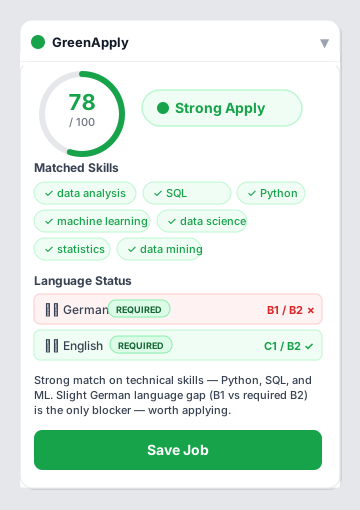
Instant AI-powered job-fit scoring for international students and professionals in Germany. Score, analyse, and auto-fill — in under 3 seconds.
Open any job listing and get a complete fit analysis — no copy-pasting, no guessing.
Every job page gets a 0–100 score and a colour-coded verdict the moment you open it. Weighs skills, language, employment type, location, experience, and salary against your profile.
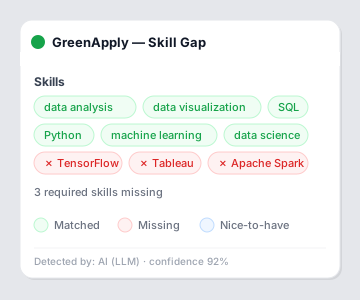
See exactly which of your skills match the job requirements, which are missing, and which are nice-to-have bonuses — colour-coded at a glance so you know where you stand.
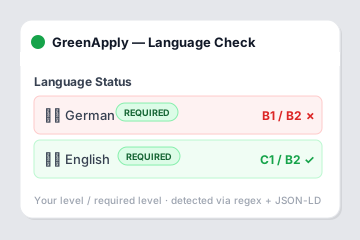
Detects explicit German and English requirements using a multi-layer approach (JSON-LD → regex → AI), then compares them against your CEFR levels. No more C1 surprises on page 3.
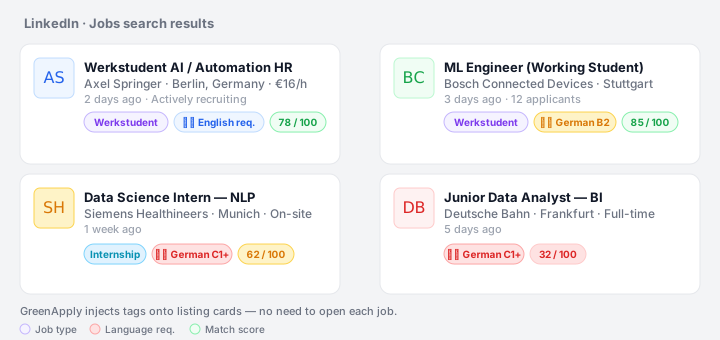
On listing pages, GreenApply injects quick-read tags directly onto job cards. See language requirements, job type, and cached match scores without opening every listing.
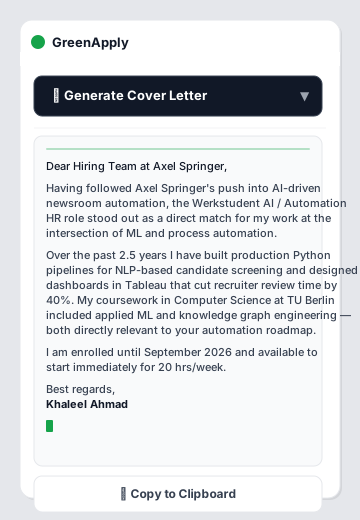
One click generates a tailored cover letter that references your actual skills and the specific role — streamed live. Uses a semantic vector index of your résumé to avoid inflating your experience.
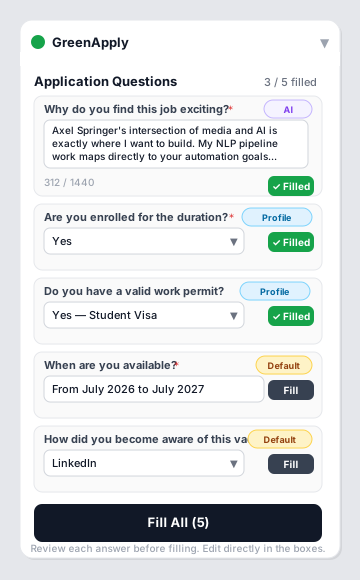
Detects questions on SmartRecruiters, Greenhouse, Workday, and 15+ ATS platforms. Generates answers for motivation questions, enrollment status, work permit fields, and more.
A quick tour through the main extension screens, with the UI polished and framed for the website.
Every factor is weighted and explained. No black box.
Dedicated extractors for major ATS systems plus all major German and global job boards.
Clone, build, and load in Chrome. No account required.
Chrome / Chromium 120+, Node.js 20+, and an NVIDIA NIM API key (free tier available) for AI features.
Clone the repository and install dependencies with npm.
Run npm run build, then load the dist/ folder as an unpacked extension.
Upload your résumé, set your languages and CEFR levels, then paste your NVIDIA NIM API key in Settings.
# 1. Clone the repo
git clone https://github.com/khaleel-git/GreenApply.git
cd GreenApply

# 2. Install dependencies
npm install

# 3. Build the extension
npm run build
# → outputs to dist/

# 4. Load in Chrome
#    chrome://extensions → Enable Developer mode → Load unpacked → select dist/
# After loading the extension:
1. Click the GreenApply icon → Settings
2. Resume tab        → Upload PDF or DOCX (parsed locally)
3. Languages tab     → Set your CEFR levels (A1–C2)
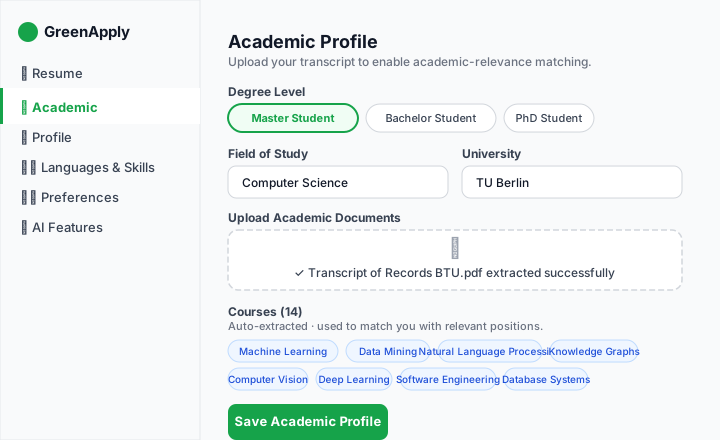
4. Academic tab      → Upload transcript (optional)
5. Preferences tab   → Job types, remote, minimum salary
6. AI Features tab   → Paste your NVIDIA NIM API key
Cover letter generation, score explanations, and application Q&A require a free NVIDIA NIM API key.
Visit the NVIDIA Build portal and sign in or register for a free account.
build.nvidia.com →After logging in, click your profile icon (top-right) → API Keys → Generate Personal Key.
Your key starts with nvapi-. Copy it immediately — it will not be shown again.
Click the GreenApply icon in your toolbar → Settings → AI Features tab → paste the key in the NVIDIA NIM API Key field → Save.
NVIDIA NIM API Key:  nvapi-xxxxxxxxxxxxxxxxxxxx

# Models used automatically:
# - meta/llama-3.1-8b-instruct   → job data extraction
# - meta/llama-3.3-70b-instruct  → cover letters & Q&A
# - baai/bge-m3                  → résumé embeddings
Open any job listing on LinkedIn or Stepstone. If you see the GreenApply overlay with a match score, the extension is running. To test AI features specifically, open a job detail page and click Generate Cover Letter — you should see text start streaming within a few seconds.
This project is meant to be used directly by developers and power users as an unpacked extension.
Compiles TypeScript, bundles React components, and outputs a production-ready extension to dist/.
# Install dependencies first
npm install

# Production build
npm run build
# → dist/ contains the packaged extension

# Development (hot-reload)
npm run dev
# → rebuild on save, reload extension manually

# Type-check only
npm run type-check
npm run build, load the dist/ folder from chrome://extensions using Load unpacked.
Use the local build for development, review, and private installs without any store submission step.
npm run build to generate the production extension.
dist/ folder.
Built with modern web standards on a lightweight, privacy-first architecture.
| Layer | Technology |
|---|---|
| Extension framework | Chrome MV3, CRXJS + Vite |
| UI | React 19, inline styles (no external CSS deps) |
| Language | TypeScript 5.7 |
| AI inference | NVIDIA NIM — Llama 3.1 8B (extraction) · Llama 3.3 70B (cover letters) |
| Embeddings | baai/bge-m3 via NIM |
| Storage | IndexedDB via idb (local only) |
| PDF parsing | pdfjs-dist (local) |
| DOCX parsing | mammoth (local) |
No accounts, no tracking, no servers. Just your browser and NVIDIA's inference API.
All PDF and DOCX parsing happens in your browser. Your résumé is never uploaded anywhere.
Your profile and job data live in IndexedDB — never sent to any server.
Only the NVIDIA NIM API is called — carrying only the job description text and anonymised profile signals.
No analytics, no event tracking, no accounts required. Ever.